继续图形学的学习,我打算在下一周左右结束图形学的学习,因为要期中考试了(晕),现在赶赶进度
金属
一个材质的抽象类
如果想让不同的物体拥有不同的材质,我们可以设置一个通用的材质类,具有许多参数。或者我们可以有一个抽象的材质类,封装特定材质的独特行为,这里我们使用第二种方式,因为这样便于我们更好的组织代码,设置这么一个类,对于不同的材质,我们需要做两件事:
- 产生一个散射光线(或者吸收入射光线)
- 如果散射了,光线应该怎么衰减
在此基础之上,我们可以定义出我们的抽象类:
#ifndef RENDER_C___MATERIAL_H
#define RENDER_C___MATERIAL_H

#include "hittable.h"

class material{
public:
    virtual ~material() = default;

    virtual bool scatter(const ray& r_in,hit_record& rec,color& attenuation, ray& scattered) const{
        return false;
    }
};

#endif //RENDER_C___MATERIAL_H
描述光线-物体交点的数据结构
hit_record的设置目的是为了避免一大堆的参数,所以我们设置一个封装的类型,将信息参数放入其中。当然,由于hittable.h和materials.h需要在代码中能够引用对方的类,为了避免他们的循环依赖,我们向hittable文件头中添加class material来指定类的指针。
class material;

class hit_record{
public:
    point3 p;
    vec3 normal;
    shared_ptr<material> mat;	//附带了击中材料的材质的信息
    double t;
    bool front_face;

    void set_face_normal(const ray& r,const vec3& outward_normal){
        //设置交点的法线方向
        front_face = dot(r.direction(),outward_normal) < 0;
        normal = front_face ? outward_normal : -outward_normal;
    }
};
hit_record将一堆参数放入类中,然后作为一个组合发送。当光线击中一个表面是,hit_record中的材料指针被设置为球体在main中给定的指针材料。且当ray_color()获取hit_record时,它可以调用材料指针的成员函数来找出散射(如果有的话)
现在我们需要设置球体sphere类:
class sphere: public hittable{
public:
    sphere(const point3& center, double radius) : center(center), radius(std::fmax(0,radius)) {

    }

    bool hit(const ray& r,interval ray_t,hit_record& rec) const override{
        vec3 oc = center - r.origin();
        auto a = r.direction().length_squared();
        auto h = dot(r.direction(),oc);
        auto c = oc.length_squared() - radius*radius;

        auto discriminant = h*h - a*c;
        if(discriminant < 0.0){
            return false;
        }

        //解t并进行判断
        auto sqrtd = std::sqrt(discriminant);
        auto root = (h - sqrtd) / a;
        if(!ray_t.surrounds(root)){
            root = (h + sqrtd) / a;
            if(!ray_t.surrounds(root))
                return false;
        }

        rec.t = root;
        rec.p = r.at(rec.t);
        vec3 outward_normal = (rec.p - center) / radius;
        rec.set_face_normal(r,outward_normal);
        rec.mat = mat;

        return true;
    }

private:
    point3 center;
    double radius;
    shared_ptr<material> mat;
};
光线散射与反射率的建模
反射率是我们接下来需要关注的一件事情,反射率和材质 颜色有关,也会随入射光线方向变化
而我们先前的Lambertian 反射,它的反射有三种情况:
- 根据反射率R,总是散射光线并衰减光线。
- 光线有(1-R)的概率散射后不衰减
- 综上两个情况
这里为了程序的简易性,我们选择第一种情况,来实现我们的Lambertian 材料:
class lambertian: public material{
public:
    lambertian(const color& albedo) : albedo(albedo) {}

    bool scatter(const ray& r_in,hit_record& rec,color& attenuation, ray& scattered) const override{
        auto scatter_direction = rec.normal + random_unit_vector();
        scattered = ray(rec.p,scatter_direction);
        attenuation = albedo;
        return true;
    }
private:
    color albedo;
};
如果你仔细阅读会发现,我们使用的是random_unit_vector来生成一个随机的向量,这个向量可能和法线是等大反向的,从而导致零散射方向向量的情况,导致后许发生各种不良的情况。所以我们需要拦截这种可能性
所以我们创建一个新的向量方法——该方法返回一个布尔值,判断各个方向的维度会不会趋近0:
    bool near_zero() const {
        //判断各个分量是不是趋近于0
        auto s = 1e-8;
        return (std::fabs(e[0]) < s) && (std::fabs(e[1]) < s) && (std::fabs(e[2]) < s);
    }
然后更新我们的Lambertian反射:
bool scatter(const ray& r_in,hit_record& rec,color& attenuation, ray& scattered) const override{
    auto scatter_direction = rec.normal + random_unit_vector();

    //拦截危险向量
    if(scatter_direction.near_zero())
        scatter_direction = rec.normal;

    scattered = ray(rec.p,scatter_direction);
    attenuation = albedo;
    return true;
}
镜像反射
对于抛光的金属,光线不会随机的散射,而是对称的反射:
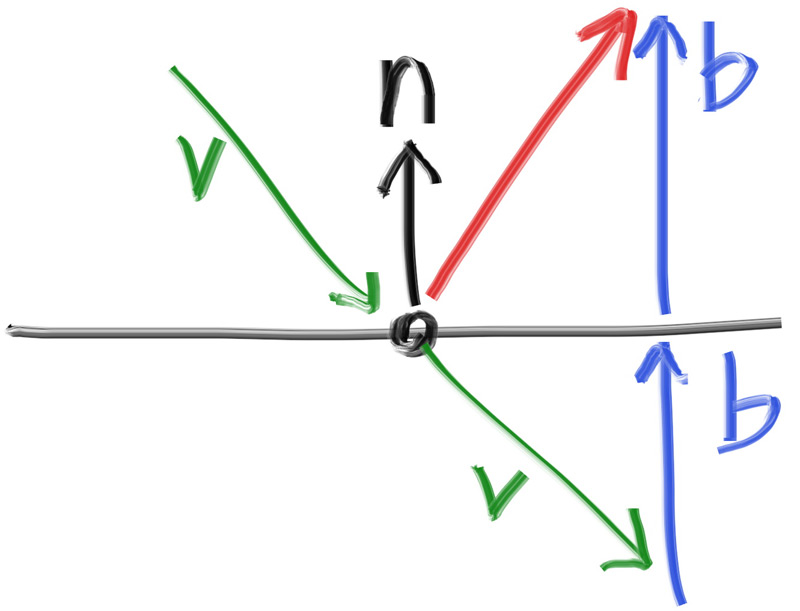
这个过程我们可以用向量来实现计算:
- 首先我们计算出向量v在n上的投影长度,然后取相反数得到b
- 然后通过v+2b,来计算出反射后的光线
我们可以写出一下程序来计算反射函数:
//vec3.h
inline vec3 reflect(const vec3& v, const vec3& n){
    //点积是v在n上的投影长度,即b的长度,*-2n则是为了校准方向
    return v - 2* dot(v,n)*n;
}
然后我们用这个函数实现我们的金属材质:
class metal: public material{
public:
    metal(const color& albedo) : albedo(albedo){}

    bool scatter(const ray& r_in,hit_record& rec,color& attenuation, ray& scattered) const override{
        vec3 reflected = reflect(r_in.direction(),rec.normal);
        scattered = ray(rec.p,reflected);
        attenuation = albedo;
        return true;
    }
private:
    color albedo;
};
我们接下来修改ray_color()函数以应用更改:
color ray_color(const ray& r,int depth, const hittable& world) const {
        //如果不进行光线的追踪,就不会光线返回
        if(depth <= 0)
            return {0,0,0};

        hit_record rec;

        if (world.hit(r, interval(0.001, infinity), rec)) {
            ray scattered;
            color attenuation;
            if(rec.mat->scatter(r,rec,attenuation,scattered))
                return attenuation* ray_color(scattered,depth-1,world);
            return {0,0,0};
        }

        vec3 unit_direction = unit_vector(r.direction());
        auto a = 0.5*(unit_direction.y() + 1.0);
        return (1.0-a)*color(1.0, 1.0, 1.0) + a*color(0.5, 0.7, 1.0);
    }
然后接着更行sphere的构造函数以初始化材质指针mat:
class sphere : public hittable {
  public:    sphere(const point3& center, double radius, shared_ptr<material> mat)
      : center(center), radius(std::fmax(0,radius)), mat(mat) {}
    ...
};
金属球体在场景中
现在我们向场景中添加我们的金属球体
int main(){
    hittable_list world;

    auto material_ground = make_shared<lambertian>(color(0.8, 0.8, 0.0));
    auto material_center = make_shared<lambertian>(color(0.1, 0.2, 0.5));
    auto material_left   = make_shared<metal>(color(0.8, 0.8, 0.8));
    auto material_right  = make_shared<metal>(color(0.8, 0.6, 0.2));

    world.add(make_shared<sphere>(point3( 0.0, -100.5, -1.0), 100.0, material_ground));
    world.add(make_shared<sphere>(point3( 0.0,    0.0, -1.5),   0.5, material_center));
    world.add(make_shared<sphere>(point3(-1.0,    0.0, -1.0),   0.5, material_left));
    world.add(make_shared<sphere>(point3( 1.0,    -0.3, -1.0),   0.2, material_right));
	...
    cam.render(world);
}
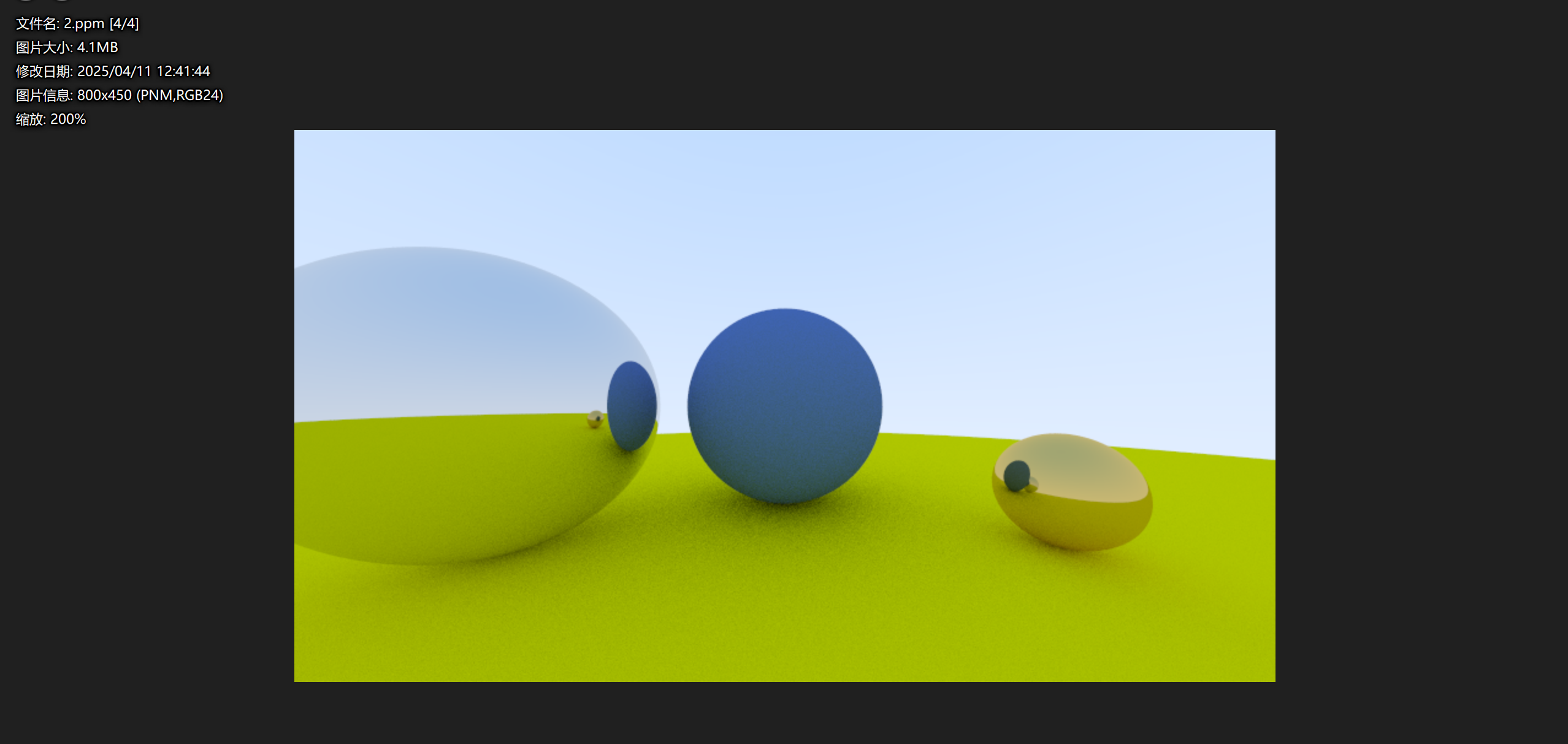
成功渲染了出来,看:
模糊反射
我们的金属球体太过完美,但是现实中我们往往也会看到各种磨砂材质的金属,所以在这里我们要引入一个新的变量fuzz,来随机化反射方向。我们使用一个随机点,以原始起点为中心,来模糊反射的光线。
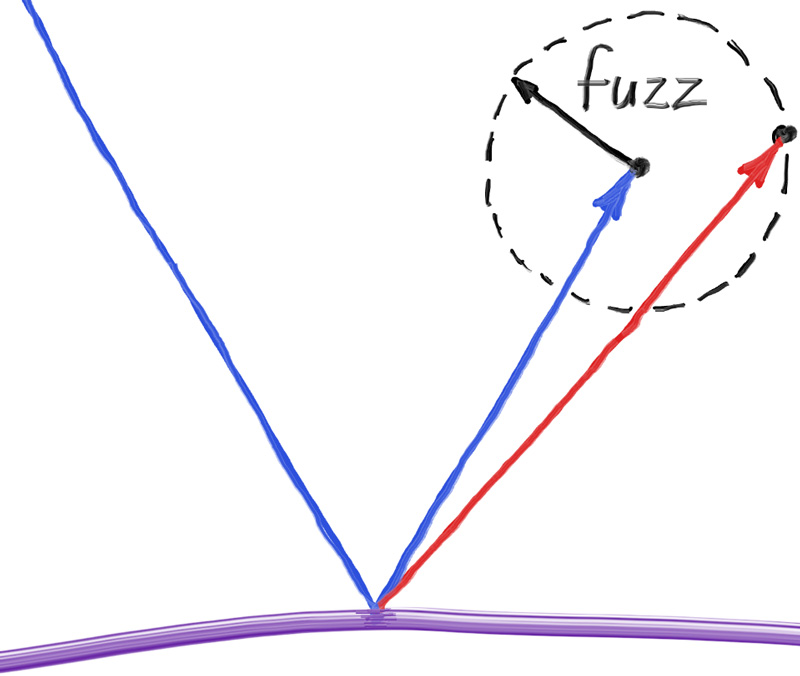
我们用fuzz来决定模糊球体的大小,模糊球体越大,反射效果就越明显。当模糊球体较大或光线几乎平行于表面时(称为掠射光线),计算出的反射光线可能会指向物体内部,即在物体表面下方。对于这种情况,可以选择简单地吸收这些光线,即认为它们没有从物体表面反射出去。
为了确保模糊球体相对于反射光线的尺度是一致的,需要对反射光线进行归一化处理,即调整其长度为1。这样做可以确保无论反射光线的长度如何变化,模糊球体的尺度都是相对于光线方向的,而不是其长度。
于是我们可以更改以下程序以实现这个功能:
class metal: public material{
public:
    metal(const color& albedo) : albedo(albedo){}

    bool scatter(const ray& r_in,hit_record& rec,color& attenuation, ray& scattered) const override{
        vec3 reflected = reflect(r_in.direction(),rec.normal);
        reflected = unit_vector(reflected) + (fuzz*random_unit_vector());
        scattered = ray(rec.p,reflected);
        attenuation = albedo;
        return (dot(scattered.direction(),rec.normal) > 0);
    }
private:
    color albedo;
    double fuzz;
};
然后调整一下我们的main函数:
int main(){
	...
    world.add(make_shared<sphere>(point3( 0.0, -100.5, -1.0), 100.0, material_ground));
    world.add(make_shared<sphere>(point3( 0.0,    0.0, -1.5),   0.5, material_center));
    world.add(make_shared<sphere>(point3(-1.0,    0.0, -1.0),   0.5, material_left));
    world.add(make_shared<sphere>(point3( 1.0,    -0.3, -1.0),   0.2, material_right));
	...
}
渲染出来的是这样的:
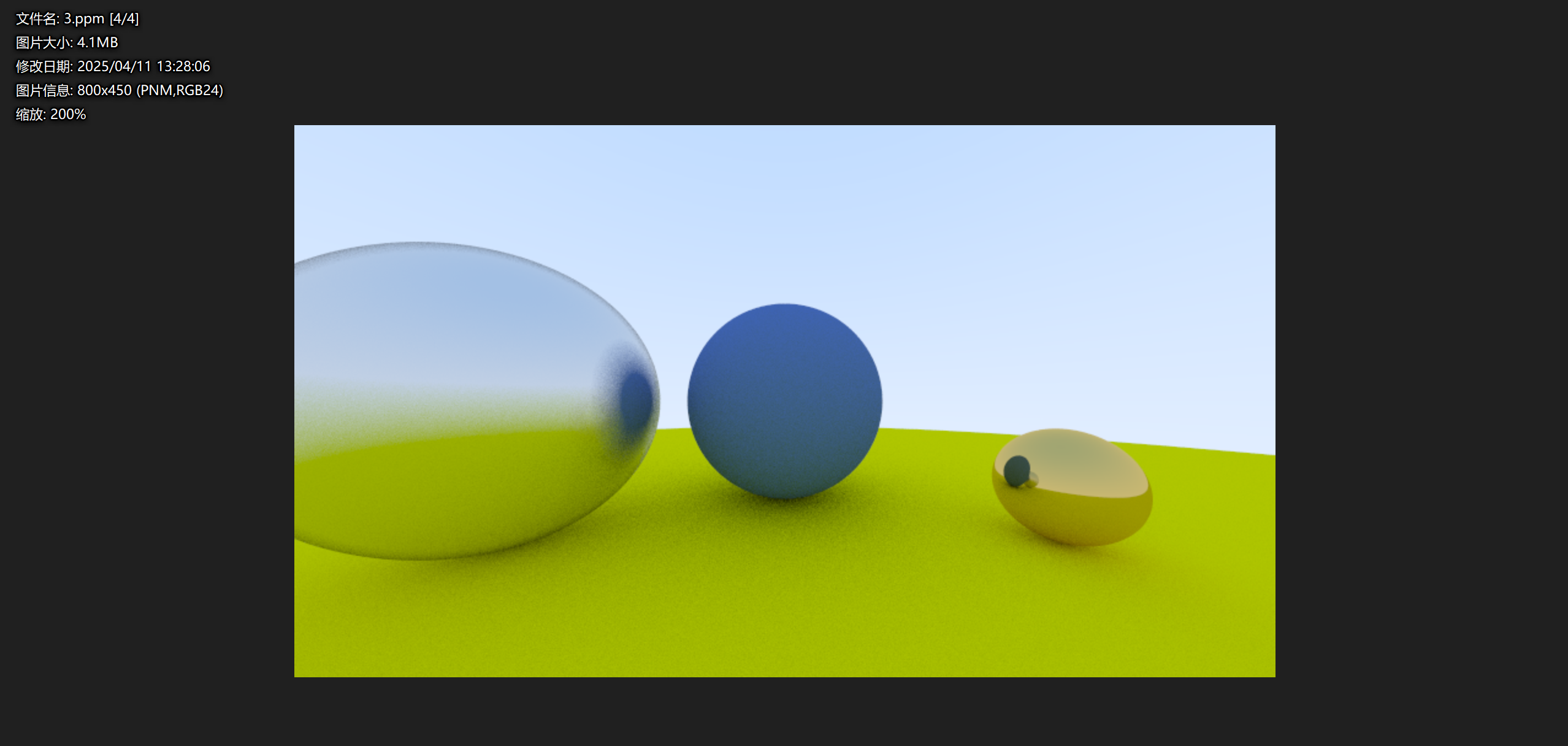
可以看到左边有明显的模糊感